- Send documents for approval:
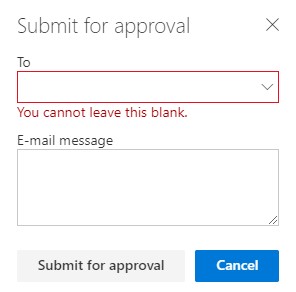
- You can now select a document and send it for an approval process by clicking on a “Submit for approval” function in the toolbar:

- You define which user should approve it and optionally add a message:
- The approver now gets an e-mail notification with links to the document and the task:

- The document will also be shown in the approver’s MetaShare’s tasks page:
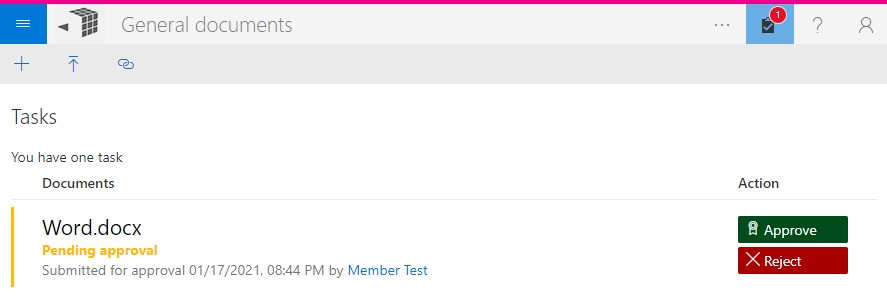
- An e-mail message will be sent to the person that sent the document for approval, once it has been approved or rejected.
- You can now select a document and send it for an approval process by clicking on a “Submit for approval” function in the toolbar:
- Be able to deselect documents:
- We have made it easier to deselect multiple documents by adding a function for this in the toolbar, next to the sort function:

This function shows how many documents have been selected and if you click on it, the documents will be deselected.
- We have made it easier to deselect multiple documents by adding a function for this in the toolbar, next to the sort function:
- Enhancements to the move function (cutting and pasting documents):
- Maintaining Modified/Modified by:
- Previously, when documents were moved between workspaces, they got new “Modified” and “Modified by” values, reflecting the time when the documents were moved and the person that moved the file. Now we instead maintain both these values from the source files so neither “Modified” nor “Modified by” will be changed after a document has been moved.
- Check metadata validity when moving documents between workspaces:
- Previously, when documents were moved between workspaces that had a column with the same display name but whose choices were different, the values were moved even if they were not available at the destination workspace. Now we instead remove any invalid values when they are pasted and if they are mandatory, the documents will be shown as a document with missing properties, in MetaShare’s task page.
- Ensure that properties are set even when a document is automatically checked out:
- Previously, in some rare situations, when moving documents between workspaces, the documents could automatically be checked out to the logged in user and thereby not made visible for other users till they got checked in. When this happened, some metadata that had been filled in, in the document property form, could not be set. Now we ensure that all filled in document properties are set and that the documents get checked in.
- Show error message when moving documents that are larger than 50 MB:
- If you try to move documents that are larger than the current limitation of 50 MB, you get a descriptive error message with a link to a page with instructions on how to move the documents using another method:
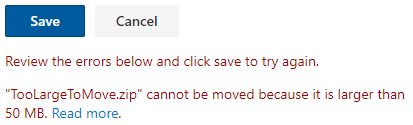
- If you try to move documents that are larger than the current limitation of 50 MB, you get a descriptive error message with a link to a page with instructions on how to move the documents using another method:
- Maintaining Modified/Modified by:
- Reordered functions in MetaShare’s toolbar:
- Extended support for different column types (types of metadata fields) in the document property form, document view and document filter:
- MetaShare now supports displaying “Yes/No (checkbox)” and “Multiple lines of text” columns, in the document view. Examples of these are shown below:

- “Yes/No (checkbox)” columns are now also filterable, both by clicking on any of the values in the document view or by opening a document filter and selecting one of its value:

- If “Single lines of text” columns have a default value, this value is prefilled in the document property form, both when creating or when uploading documents.
- In order to differentiate between users with the same name, in “Person or Group” columns, the users’ login names (e-mail addresses) are now shown below their display names, in the document property form.
- MetaShare now supports displaying “Yes/No (checkbox)” and “Multiple lines of text” columns, in the document view. Examples of these are shown below:
- Enhancement to SharePoint/Teams integration:
- Previously, in some situations, when opening documents from MetaShare from a tab in a Microsoft Teams’ channel, you could get this error message: “Unable to deserialize cloned data due to invalid or unsupported version.” This error message is no longer shown.
- Workspace configuration: renamed term set for document types:
- As the term set that defines the suggested templates can be other terms than document types, we have, in MetaShare settings, renamed the field “Term set for document types” to “Term set that defines suggested templates”:

- As the term set that defines the suggested templates can be other terms than document types, we have, in MetaShare settings, renamed the field “Term set for document types” to “Term set that defines suggested templates”:
- Enhancements for MetaShare Server:
- As SharePoint server (on-prem) does not support previewing files in SharePoint’s web viewer, for all of the file types that SharePoint online supports, we now ensure that only the supported files are opened in SharePoint’s web viewer.
- MetaShare’s generic error message mentions “Microsoft Office 365”. This will now not be shown to users using MetaShare Server.
